iMessage
Why don't my messages sync?
07/01/26
I have a quick question if you don’t mind. My messages between my phone and MacBook aren’t always syncing. Sometimes they are and sometimes not - this just started a few days ago. Any helpful tips?
___________
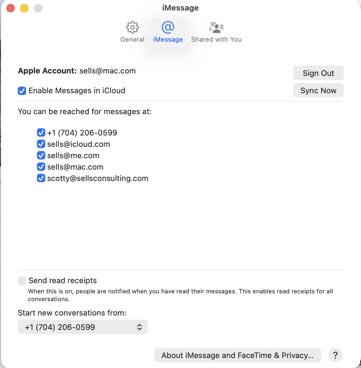
Messages can move between devices based on either your AppleID or your phone number. Making sure you have allowed for both is the first step to ensuring messages sync (with one exception I'll get to in a moment). Go to settings in Messages on both your phone and computer or iPad and make sure all are checked and that "Start new conversations from" is set to your phone number. Also, importantly, be sure that "enable messages in the cloud is checked" as seen below:
Finally, you may be aware by now there is a big difference between green and blue messages. Think of it like this, blue messages are delivered by Apple via your AppleID and iMessage. Green messages are either from Android users that don't have an AppleID, iPhone users that have never logged in to iMessage, or from a message that couldn't be delivered otherwise. Green messages are typically being delivered by the phone company and blue messages are delivered by Apple. (Generalization but you get the point). Thus, green messages have a hard time crossing over to AppleID only devices like computers and iPads. Since those devices don't actually have phone numbers, it then relies on Apple to sync them and that doesn't always go well.
___________
Messages can move between devices based on either your AppleID or your phone number. Making sure you have allowed for both is the first step to ensuring messages sync (with one exception I'll get to in a moment). Go to settings in Messages on both your phone and computer or iPad and make sure all are checked and that "Start new conversations from" is set to your phone number. Also, importantly, be sure that "enable messages in the cloud is checked" as seen below:
Finally, you may be aware by now there is a big difference between green and blue messages. Think of it like this, blue messages are delivered by Apple via your AppleID and iMessage. Green messages are either from Android users that don't have an AppleID, iPhone users that have never logged in to iMessage, or from a message that couldn't be delivered otherwise. Green messages are typically being delivered by the phone company and blue messages are delivered by Apple. (Generalization but you get the point). Thus, green messages have a hard time crossing over to AppleID only devices like computers and iPads. Since those devices don't actually have phone numbers, it then relies on Apple to sync them and that doesn't always go well.
How do I sync text messages across my devices
22/03/25
How do I sync iPad texts to Mac & phone texts?
___________
First, make sure you're logged into your AppleID on all devices. Next, on the phone and iPad go to settings, on the computer you'll be going to settings within the Messages application itself.
Once in settings on the phone and iPad, scroll to the bottom and select "all apps". Next scroll down to the m's and find messages. Now that you're in the settings area for messages you can check to be sure of the following:
1. You are using your AppleID for iMessage and iMessage is turned on on both devices.
2. You have both your phone number checked as well as your email address in receive but only the phone number checked on outgoing messages.
Repeat the process on the computer by opening the messages application, go to settings within the application and compare the same settings. If you see a box that says "Enable messages in the cloud" be sure that's checked as well.
___________
First, make sure you're logged into your AppleID on all devices. Next, on the phone and iPad go to settings, on the computer you'll be going to settings within the Messages application itself.
Once in settings on the phone and iPad, scroll to the bottom and select "all apps". Next scroll down to the m's and find messages. Now that you're in the settings area for messages you can check to be sure of the following:
1. You are using your AppleID for iMessage and iMessage is turned on on both devices.
2. You have both your phone number checked as well as your email address in receive but only the phone number checked on outgoing messages.
Repeat the process on the computer by opening the messages application, go to settings within the application and compare the same settings. If you see a box that says "Enable messages in the cloud" be sure that's checked as well.
eSIM turned off iMessage
18/06/24
Ever since I changed my eSim, now I'm only getting green text messages.
___________
Should be an easy fix…On your phone, go to Settings:
Scroll down to Messages:
Be sure that iMessage is turned on: (You may be asked to log in to your Apple ID.)
Under “Send & Receive” be sure that both your email AND phone number are checked.
Start new conversations from Phone.
___________
Should be an easy fix…On your phone, go to Settings:
Scroll down to Messages:
Be sure that iMessage is turned on: (You may be asked to log in to your Apple ID.)
Under “Send & Receive” be sure that both your email AND phone number are checked.
Start new conversations from Phone.
Why aren't all my text messages syncing?
02/02/21
Can you let me know how to fix my messages on my phone? I believe I asked how to see texts from
A week ago. I can not figure out the corrrect settings
___________
First thing to check is that both your email address (appleID) and phone number are associated to each other.
On the phone go to Settings/Messages/. Now make sure “iMessage” is turned on.
Next, under “Send and Receive” be sure everything is checked. Phone number and any/all email addresses listed there.
Now, on the computer, open Messages then go to Message Preferences. Check all items as seen below including “Enable Messages in the Cloud” then hit sync.
Often the reason for not seeing all your texts is that the phone number and AppleID are not associated to each other. Therefore messages that were sent to you using one method might not show on all devices. Another popular reason is that the sender is using an Android phone therefore making their messages appear green. Green messages don’t always sync properly as they are handled exclusively by the phone company. 95% of all other messages are blue and are handled via Apple’s servers bypassing the texting plans on phone companies entirely.
A week ago. I can not figure out the corrrect settings
___________
First thing to check is that both your email address (appleID) and phone number are associated to each other.
On the phone go to Settings/Messages/. Now make sure “iMessage” is turned on.
Next, under “Send and Receive” be sure everything is checked. Phone number and any/all email addresses listed there.
Now, on the computer, open Messages then go to Message Preferences. Check all items as seen below including “Enable Messages in the Cloud” then hit sync.
Often the reason for not seeing all your texts is that the phone number and AppleID are not associated to each other. Therefore messages that were sent to you using one method might not show on all devices. Another popular reason is that the sender is using an Android phone therefore making their messages appear green. Green messages don’t always sync properly as they are handled exclusively by the phone company. 95% of all other messages are blue and are handled via Apple’s servers bypassing the texting plans on phone companies entirely.
Adding your phone number to iMessage
24/08/17
Scotty, texts that I send from my laptop are not showing up on my phone and vice versa. That is a new phenomenon since you were here and set up my new computer et. al. Any ideas what I have done to it??
___________
Sounds like your phone number is not currently associated to your apple ID. To fix this, go to your phone: settings: messages. Now log into your apple ID to use with iMessage.
Next open iMessage on your computer. Now go to the preferences for that application. You should now see your iPhone phone number. Messages will now appear on both devices but deleting a message will not sync. That feature is not yet available.
___________
Sounds like your phone number is not currently associated to your apple ID. To fix this, go to your phone: settings: messages. Now log into your apple ID to use with iMessage.
Next open iMessage on your computer. Now go to the preferences for that application. You should now see your iPhone phone number. Messages will now appear on both devices but deleting a message will not sync. That feature is not yet available.

Sells Consulting email