January 2026
Are all my passwords compromised?
20/01/26 Filed in: passwords
Scotty, In the passwords app a long list of places have “reused password” instead of compromised password. Do I also need to update those passwords?
___________
Apple considers passwords compromised under three circumstances:
1. Password is too easy
2. Password has been used on another account as well
3. Password WAS actually found in a data leak.
Everybody reuses passwords. It’s unreasonable to ask ourselves to use a completely different password for every account. So I don’t see it as too big a deal at all. As I said before, if it’s strong then don’t worry about it. If it’s on a low priority account like Food Lion or a car wash site, don’t worry about it.
___________
Apple considers passwords compromised under three circumstances:
1. Password is too easy
2. Password has been used on another account as well
3. Password WAS actually found in a data leak.
Everybody reuses passwords. It’s unreasonable to ask ourselves to use a completely different password for every account. So I don’t see it as too big a deal at all. As I said before, if it’s strong then don’t worry about it. If it’s on a low priority account like Food Lion or a car wash site, don’t worry about it.
partitioned drive not mounting
12/01/26 Filed in: Backup | time machine
I JUST realized that the archive partition of my external hard drive is not mounting. The other partition (Time Machine with 2 years of hard drive backups is fine.)
I have tried mounting the archive portion via Disk Utility—but to no avail.
___________
Well that could be a mess. Because that portion is not on the same level as listed in disk utility, that leads me to believe they may not be formatted the same way or one is a partition within the other. Regardless, something doesn’t look right there. In my opinion, one should not use a partitioned drive as a backup Time Machine. Where would the second copy of the data that lives on the other partition reside? The drive will not backup itself. So in the future I do suggest one dedicated drive to Time Machine. Then that drive can back up multiple other drives to itself as long as the space is there to do so.
First thing to try is to simply try plugging the drive into a different computer, preferably with a different OS running. Or at least a different Mac.
Second, of course restart your Mac with the drive connected.
Third, try to repair the dis using disk utility. If you have data on that partition that does not live anywhere else then there are third party tools we may be able to use to try to retrieve the data but if that tool was not running initially then the recovery chances go down. Data Rescue is my fav but it’s not cheap. I’ve tried them all and own licenses to them all so if worse comes to worse, and you REALLY need that data, I may be able to workshop the drive over time.
Sounds like you are trying all logical steps so far however.
I have tried mounting the archive portion via Disk Utility—but to no avail.
___________
Well that could be a mess. Because that portion is not on the same level as listed in disk utility, that leads me to believe they may not be formatted the same way or one is a partition within the other. Regardless, something doesn’t look right there. In my opinion, one should not use a partitioned drive as a backup Time Machine. Where would the second copy of the data that lives on the other partition reside? The drive will not backup itself. So in the future I do suggest one dedicated drive to Time Machine. Then that drive can back up multiple other drives to itself as long as the space is there to do so.
First thing to try is to simply try plugging the drive into a different computer, preferably with a different OS running. Or at least a different Mac.
Second, of course restart your Mac with the drive connected.
Third, try to repair the dis using disk utility. If you have data on that partition that does not live anywhere else then there are third party tools we may be able to use to try to retrieve the data but if that tool was not running initially then the recovery chances go down. Data Rescue is my fav but it’s not cheap. I’ve tried them all and own licenses to them all so if worse comes to worse, and you REALLY need that data, I may be able to workshop the drive over time.
Sounds like you are trying all logical steps so far however.
What do I do with zip files after I opened them?
11/01/26 Filed in: general troubleshooting
Can I throw away zip files from the downloads folder after I've used them?
___________
Yes. After the file's been unzipped and whatever documents or files have been moved, viewed, saved etc… then you don't need the zip files anymore. Since the item is in the downloads folder that means you got it from the internet and in most cases could get it again. So toss away.
___________
Yes. After the file's been unzipped and whatever documents or files have been moved, viewed, saved etc… then you don't need the zip files anymore. Since the item is in the downloads folder that means you got it from the internet and in most cases could get it again. So toss away.
Why don't my messages sync?
07/01/26 Filed in: iMessage
I have a quick question if you don’t mind. My messages between my phone and MacBook aren’t always syncing. Sometimes they are and sometimes not - this just started a few days ago. Any helpful tips?
___________
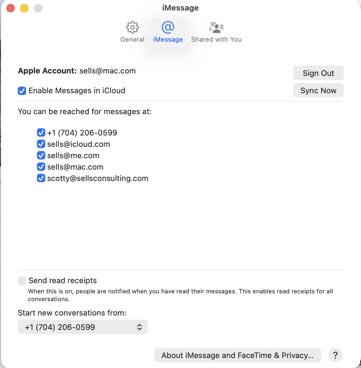
Messages can move between devices based on either your AppleID or your phone number. Making sure you have allowed for both is the first step to ensuring messages sync (with one exception I'll get to in a moment). Go to settings in Messages on both your phone and computer or iPad and make sure all are checked and that "Start new conversations from" is set to your phone number. Also, importantly, be sure that "enable messages in the cloud is checked" as seen below:
Finally, you may be aware by now there is a big difference between green and blue messages. Think of it like this, blue messages are delivered by Apple via your AppleID and iMessage. Green messages are either from Android users that don't have an AppleID, iPhone users that have never logged in to iMessage, or from a message that couldn't be delivered otherwise. Green messages are typically being delivered by the phone company and blue messages are delivered by Apple. (Generalization but you get the point). Thus, green messages have a hard time crossing over to AppleID only devices like computers and iPads. Since those devices don't actually have phone numbers, it then relies on Apple to sync them and that doesn't always go well.
___________
Messages can move between devices based on either your AppleID or your phone number. Making sure you have allowed for both is the first step to ensuring messages sync (with one exception I'll get to in a moment). Go to settings in Messages on both your phone and computer or iPad and make sure all are checked and that "Start new conversations from" is set to your phone number. Also, importantly, be sure that "enable messages in the cloud is checked" as seen below:
Finally, you may be aware by now there is a big difference between green and blue messages. Think of it like this, blue messages are delivered by Apple via your AppleID and iMessage. Green messages are either from Android users that don't have an AppleID, iPhone users that have never logged in to iMessage, or from a message that couldn't be delivered otherwise. Green messages are typically being delivered by the phone company and blue messages are delivered by Apple. (Generalization but you get the point). Thus, green messages have a hard time crossing over to AppleID only devices like computers and iPads. Since those devices don't actually have phone numbers, it then relies on Apple to sync them and that doesn't always go well.

Sells Consulting email